How to Set Up an AI Receptionist for Your Real Estate Business (2026 Step-by-Step Guide)
Disclosure: This post contains affiliate links. If you buy through them, we may earn a commission at no extra cost to you. We only recommend tools we would use in a real estate business.
Setting up an AI receptionist for real estate takes less time than staging a single listing — most agents are live in under 30 minutes. This guide walks through the exact setup process step by step: what information to gather beforehand, how to configure the knowledge base and call flows, and how to connect your calendar so every call turns into a booked showing or a qualified lead instead of a missed voicemail.
Why agents are switching to an AI receptionist
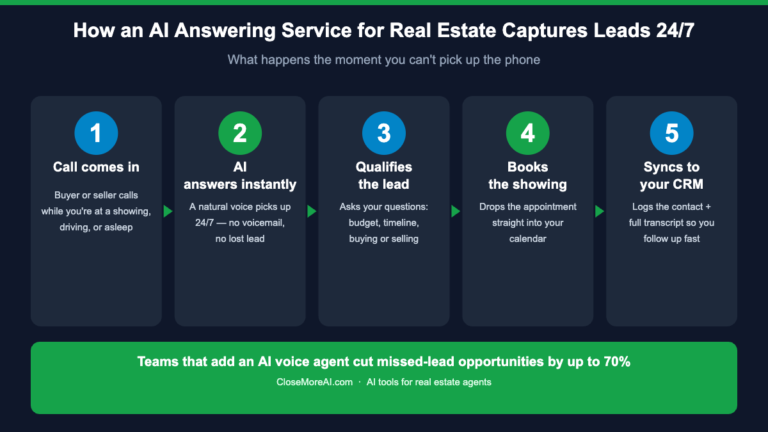
Real estate calls do not stop at 6 p.m. — buyer inquiries, showing requests, and after-hours seller questions keep coming, and every one that hits voicemail is a lead a competitor might answer first. An AI receptionist for real estate picks up every call 24/7, qualifies the caller, and books the next step directly into your calendar. We cover the buyer-side case for this in our AI receptionist cost & ROI guide — this post focuses purely on getting one running correctly.

Before you start: what to gather
Setup goes faster if you collect these first:
- Your standard FAQ answers: office hours, service areas, typical commission structure questions, and how you handle showings.
- Calendar access: Google Calendar or Outlook credentials for the account you want bookings to land on.
- A forwarding plan: whether you’ll port your existing number or forward calls from it to the AI’s number.
- Escalation rules: which calls should ring you live immediately (e.g., an existing client, an offer coming in) versus which the AI should fully handle.
Step-by-step setup
We use My AI Front Desk as the reference tool below because it is the fastest self-serve option for agents — see our full My AI Front Desk review for a deeper walkthrough of the platform itself. The general steps apply to most AI receptionist tools:
- Create your account and pick a plan. Start on the entry tier — you can upgrade minutes later once you see real call volume.
- Build the knowledge base. Paste in your bio, service areas, brokerage info, and the FAQ answers you gathered above. The more specific, the fewer calls get escalated unnecessarily.
- Connect your calendar. Authorize the calendar integration so the AI can see real availability and book showings or calls without double-booking you.
- Set your call flow and greeting. Write a short, on-brand greeting (“Thanks for calling [Name] Real Estate…”) and define what happens for buyer calls vs. seller calls vs. general questions.
- Forward or port your number. Either forward your existing business line to the AI’s number, or port the number entirely if you want a single line going forward.
- Run test calls. Call your own line from a different phone and try a buyer inquiry, a showing request, and an edge case (e.g., asking for a referral) to confirm the AI handles or escalates correctly.
- Turn on transcripts and notifications. Enable text or email summaries after each call so you can skim activity in seconds instead of listening to recordings.
Configuration checklist
| Item | Why it matters | Done? |
|---|---|---|
| Knowledge base filled in | Reduces “I don’t know” answers and escalations | ☐ |
| Calendar connected | Enables real-time booking without double-booking | ☐ |
| Number forwarded/ported | Callers reach the AI on your existing number | ☐ |
| Escalation rules set | Hot leads and existing clients still reach you live | ☐ |
| Transcripts/notifications on | Lets you review every call in under a minute | ☐ |
| Test calls completed | Confirms the flow works before it’s live to real callers | ☐ |
What setup costs
There is no separate “setup fee” with self-serve tools — you pay the monthly plan and configure it yourself in one sitting. Plans for a solo agent typically start around $99/month with a set number of included minutes; see our full My AI Front Desk pricing breakdown for the plan-by-plan numbers, or compare it head-to-head with a human-staffed option in our My AI Front Desk vs Smith.ai comparison.
→ Set up your AI receptionist free trial
Common setup mistakes to avoid
- Skipping the knowledge base. A thin knowledge base means more calls get escalated or mishandled — spend the extra 15 minutes filling it in properly.
- Forgetting escalation rules. Make sure repeat clients and time-sensitive calls (like an incoming offer) still reach you directly.
- Not testing before go-live. Always place a few test calls yourself before forwarding your real business line.
- Ignoring transcripts. The transcript log is where you catch tone or accuracy issues early — check it daily for the first week.
Once your receptionist is live, pair it with the rest of your stack — see our roundup of the best AI answering services for real estate agents and the full best AI tools for real estate agents guide for what to add next.
What to put in your AI receptionist’s real estate call script
The single biggest factor in whether your AI receptionist actually books showings is the call script you configure during setup — the greeting, the qualifying questions, and the escalation rules. Here is a proven real-estate call flow you can copy into any AI receptionist:
- Greeting: “Thanks for calling [Your Name] with [Brokerage] — I’m the office assistant and I can help you book a showing, get pricing, or answer questions about a listing. What can I help you with today?”
- Qualify the caller: ask whether they are buying, selling, or renting; which property or area they are interested in; and their timeline. Those three answers separate a hot lead from a tire-kicker.
- Capture contact details: name, phone, and email — read back to the caller so a wrong digit never costs you the lead.
- Book the next step: offer two concrete showing or call-back windows and write the booking straight to your calendar.
- Escalation: route existing clients, closings, and anything urgent to ring you live; everything else the AI handles and texts you a transcript.
Load these into the knowledge base during setup, then refine them from real call transcripts in week one — that feedback loop is what turns a generic bot into a receptionist that sounds like it works for your business.
Which AI receptionist is easiest to set up for real estate agents?
If you want the fastest path from sign-up to a live, call-answering number, My AI Front Desk (now branded Frontdesk) is the self-serve tool we point solo agents and small teams to. Setup is genuinely a same-afternoon job: paste in your FAQ answers, connect Google Calendar or Outlook, forward your existing number, and you’re live — no developer and no phone-system migration.
Verified 2026 pricing: a Basic plan at $20/month ($16 billed annually) and the Business-in-a-Box plan at $99/month ($79 annually), each with a 7-day trial and a small free tier (20 voice minutes) to test call quality first. Voice usage past your included minutes runs about $0.25 per minute (25 credits), and a white-label reseller tier starts around $500/month for brokerages. For a single agent, the $99 Business-in-a-Box plan is the sweet spot — it covers voice, SMS, and calendar booking from one shared credit pool. Start a free My AI Front Desk trial and your real estate receptionist can be answering calls before your next open house.
Get the free 2026 AI Toolkit for Real Estate Agents
The 25 AI tools we’ve tested — with the workflows, prompts and per-lead cost math we use to judge them. Enter your email and we’ll send it straight over:
FAQ
How long does it take to set up an AI receptionist?
Most agents finish initial setup — knowledge base, calendar, greeting, and number forwarding — in 20 to 30 minutes. Fine-tuning the knowledge base based on real call transcripts continues for the first week or two.
Do I need to change my phone number?
No. Most tools let you forward your existing business number to the AI receptionist’s number, so clients keep dialing the number they already have.
Can I still take calls myself?
Yes. Escalation rules let specific calls (existing clients, urgent matters) ring through to you live while everything else is handled by the AI.
How much does it cost to set up an AI receptionist for real estate?
Setup itself is free on most self-serve tools — you only pay the monthly subscription. Plans for real estate agents typically run from about $20/month for a basic single-line receptionist to $99/month for a full “business-in-a-box” tier with SMS, calendar booking, and more included minutes. Expect roughly $0.25 per minute for voice usage beyond your plan’s included minutes.
Can an AI receptionist qualify real estate leads automatically?
Yes. During setup you define qualifying questions — buying vs. selling, property or area, budget, and timeline — and the AI asks them on every call, captures the answers, and tags the lead before booking a showing or routing a hot buyer to you. That is the difference between a voicemail box and a 24/7 lead-qualification system.
Does an AI receptionist work with my real estate CRM?
Most AI receptionists connect to your calendar (Google or Outlook) out of the box and push leads to a CRM through native integrations or a tool like Zapier. During setup, connect the calendar first so bookings land correctly, then wire up the CRM hand-off so every qualified caller becomes a contact record automatically.
Free resource: grab our free 2026 AI Toolkit for Real Estate Agents — the exact stack we recommend, including phone, staging, and lead-gen tools.