Do AI Headshots Look Fake? What Realtors Need to Know (2026)
Do AI headshots look fake? It’s the question every agent asks before uploading a single selfie, and it’s the right one — your headshot sits on Zillow, your business card, and every social profile, so an image that reads as obviously artificial can quietly cost you trust. The honest answer in 2026 is: the bad ones look fake, the good ones don’t, and the difference comes down to the tool you pick and the photos you feed it. This guide shows you exactly what makes an AI headshot look fake, how the best tools avoid it, and how to make sure yours passes as a real photograph of you.
In this guide:
- The short answer
- Why some AI headshots look fake: the tells
- What separates realistic AI headshots from obvious fakes
- How to make sure yours don’t look fake
- Is it OK to use an AI headshot as a realtor?
- Which tool produces the most realistic results
- FAQs
The short answer
Modern AI headshot generators can produce portraits that are genuinely hard to distinguish from a studio photo — correct lighting, believable skin texture, natural backgrounds. But quality varies enormously between tools, and even a good tool produces a mix of hits and misses in every batch. The winning workflow isn’t “generate and use the first image.” It’s generate a large batch, then curate ruthlessly and keep only the handful that look unmistakably like you. Do that with a real-estate-grade tool and good source selfies, and almost no one can tell. Skip that discipline, or use a cheap generic generator, and the fake look shows.
Why some AI headshots look fake: the tells
When an AI headshot looks off, it’s usually one of a short list of giveaways. Knowing them is half the battle, because it tells you exactly which images to throw out:
- Waxy, over-smoothed skin. The most common tell. Real skin has pores and subtle texture; over-processed AI skin looks airbrushed to plastic, especially on the forehead and cheeks.
- Warped details at the edges. Ears, earrings, glasses frames, and collars are where models struggle. A crooked glasses arm, a melted earlobe, or a shirt collar that doesn’t sit right is an instant giveaway.
- Teeth and eyes that look off. Too-perfect or slightly misaligned teeth, and eyes that point in marginally different directions or have mismatched catchlights.
- Hair that melts into the background. Flyaway strands blending unnaturally into a blurred backdrop, or a hairline that looks painted on.
- Backgrounds that don’t add up. Garbled “text” on a bookshelf, an office plant with impossible geometry, or lighting on the background that doesn’t match the light on your face.
- It doesn’t quite look like you. The subtlest and most damaging one for an agent: a portrait that’s technically flawless but reads as a slightly different person than the one who shows up to the listing appointment.
That last point matters most in real estate, because your headshot is a promise. A client who feels catfished at the front door is a client who trusts you less — which is why likeness, not just polish, is the bar to clear.
What separates realistic AI headshots from obvious fakes
Two things decide whether your results land on the “real photo” side of the line: the engine and your inputs.
The engine. Tools built specifically for professional headshots — and especially those with a real-estate use case — are trained to hold likeness and produce natural business portraits, not stylized art. Generic, one-click “turn yourself into anything” apps are the ones that reliably produce the plastic, uncanny look, because they optimize for dramatic transformation rather than an accurate, professional you. That’s the single biggest lever, and it’s why tool choice is where this decision is won or lost.
Your inputs. Even the best engine can only work with what you give it. Blurry, repetitive, or badly lit selfies force the model to invent detail, and invented detail is exactly what looks fake. Varied angles, clear focus, and good natural light in your uploads produce dramatically more believable outputs. We walk through the full upload-and-curate process in our step-by-step on how to get a real estate headshot with AI.
How to make sure yours don’t look fake
A simple pre-flight and post-flight routine gets you natural, professional results almost every time:
- Feed it 12–15 varied, sharp selfies. Different angles and expressions, good light, no heavy filters. This is the highest-leverage step by far.
- Dress for the brand you want. If you photograph the uploads in the blazer or shirt you’d wear to a listing appointment, more outputs come back on-brand and usable.
- Generate generously. Expect to keep only 10–20% of outputs. That’s normal, not a defect — the whole model is “produce many, keep the best.”
- Zoom in on the tells before you pick. Check ears, glasses, teeth, hair edges, and the background at full size. If anything is warped, discard it — there are plenty more.
- Choose likeness over glamour. When two images tie, keep the one that most looks like you’ll look at the door, not the most flattering fantasy version.
Is it OK to use an AI headshot as a realtor?
Yes — with one guardrail. An AI headshot is a photo of you, generated from your own selfies, so using one for your branding is completely legitimate and increasingly common. The line to respect is accuracy: your headshot should represent how you actually look today, not a version that’s a decade younger, thirty pounds different, or effectively a different face. The National Association of REALTORS® Code of Ethics requires a true picture in your advertising and marketing (NAR Code of Ethics, Article 12), and that principle applies to a headshot just as it does to a listing photo. Keep the likeness honest and you’re on solid ground; use a portrait that misrepresents you and you’ve traded a little polish for a credibility problem the first time you meet a client in person.
Which tool produces the most realistic results
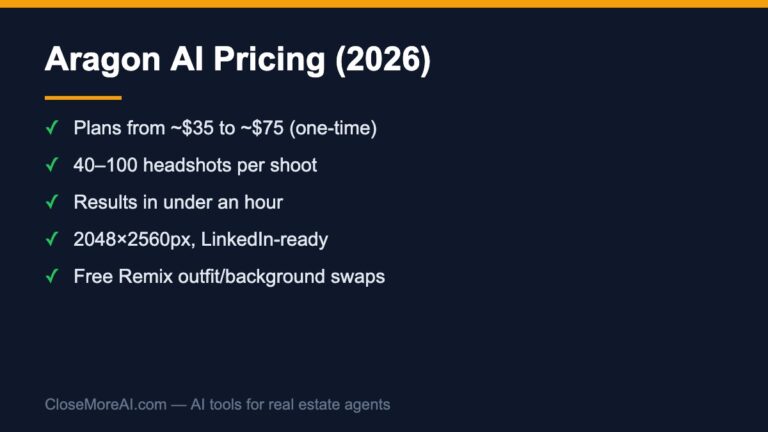
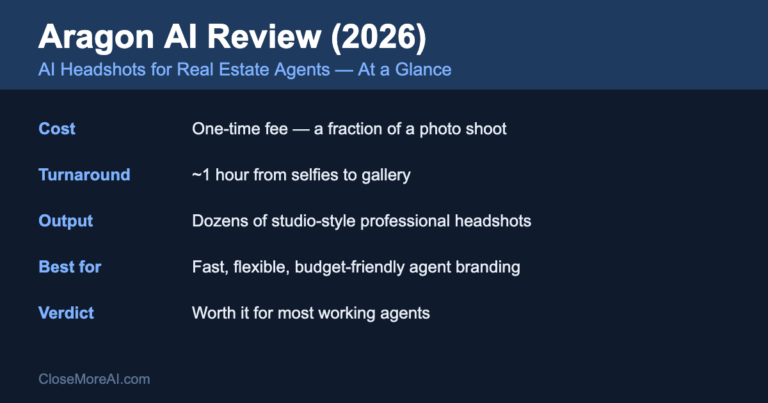
Because the engine is the biggest factor in whether your headshots look real, this is where to spend your attention. We recommend Aragon AI as our default for agents: it markets a dedicated real-estate headshot use case, holds likeness well from a good set of source selfies, and returns dozens of studio-style portraits in about an hour for a fraction of a photo-shoot fee. The realism still depends on your inputs and your curation — no tool skips those steps — but a purpose-built engine gives you far more keepers per batch than a generic app. The full breakdown of quality, pricing, and limitations is in our Aragon AI review, and we put the leading options side by side in our roundup of the best AI headshot generators for real estate agents.
Get natural, professional AI headshots with our top pick →
Still weighing AI against a studio session? Our comparison of AI headshots vs. a traditional photographer lays out when each one wins, and our AI headshot cost guide shows what you’ll actually pay.
FAQs
Can people tell if a headshot is AI-generated?
With a low-quality tool or a bad batch, yes — the tells are waxy skin, warped ears or glasses, odd teeth, and hair that melts into the background. With a professional-grade engine, good source selfies, and careful curation, a well-chosen AI headshot is very hard to distinguish from a studio photo. The key is discarding the misses rather than using the first image.
Why do my AI headshots look fake?
Usually one of two reasons: a generic app that optimizes for dramatic transformation instead of accurate likeness, or weak inputs — blurry, repetitive, or poorly lit selfies that force the model to invent detail. Fix both by using a headshot-specific tool and uploading 12–15 varied, sharp, well-lit photos, then keeping only the most natural results.
Are AI headshots good enough for a professional real estate profile?
For most agents, yes. A curated AI headshot from a real-estate-grade tool reads as a professional studio portrait at a fraction of the cost and time. The bar to clear is likeness: pick the images that genuinely look like you, and your Zillow, MLS, and social profiles all get a consistent, credible upgrade.
Do I have to disclose that my headshot is AI-generated?
There’s no general rule requiring you to label a headshot as AI-generated, because it’s still a photo of you built from your own selfies. What matters is honesty of representation: your headshot must accurately reflect how you look now, in line with the NAR Code of Ethics’ requirement for a true picture in advertising. Keep the likeness accurate and you’re fine.
Bottom line
Do AI headshots look fake? Only when you let them. The fake look comes from generic tools and lazy inputs — and it’s entirely avoidable. Feed a real-estate-grade engine a dozen sharp, varied selfies, generate a big batch, and curate for likeness over glamour, and you’ll walk away with professional portraits that pass as studio photography and still look like the agent who shows up at the door. That’s the whole game: honest likeness, ruthless curation, and the right tool. Try our top-pick AI headshot tool for real estate → and grab the free 2026 AI Toolkit for Real Estate Agents for the rest of the stack.
Related guides
- Aragon AI review — quality, pricing, and whether it’s worth it.
- Best AI headshot generators for agents — the leading tools compared.
- How to get a real estate headshot with AI — the step-by-step workflow.
- The complete guide to the best AI tools for real estate agents.