Best AI Virtual Staging Tools for Real Estate Agents (2026)
Disclosure: some links below are affiliate links. If you buy through them it costs you nothing extra, and we only recommend tools we’d actually use on a listing.
The best AI virtual staging tools let you turn an empty or dated room into a photorealistic, fully furnished listing photo in seconds — for the price of a coffee instead of the hundreds physical staging costs. In this guide we compare the AI virtual staging tools real estate agents are actually getting results with in 2026, how they stack up, and which one to start with. Not sure staging is even worth the spend? See our is virtual staging worth it? ROI data breakdown first.
Empty rooms photograph badly. They look smaller, colder, and harder for a buyer to picture as home — which is exactly why staged listings tend to sell faster and for more. The problem with physical staging is the cost and the logistics: $300–$800 per room, roughly $3,000 for an average full home, plus movers and scheduling. AI fixes that: you upload a photo of an empty (or dated) room, pick a style, and a few seconds later you get a furnished version you can drop straight into your MLS listing.
What’s in this guide
- What AI virtual staging actually does
- How we evaluated them
- The best AI virtual staging tools in 2026
- How to stage a listing with AI in 5 minutes
- FAQ
What AI virtual staging actually does
Modern AI virtual staging tools do three jobs: they recognize the room and its architecture, remove existing clutter or dated furniture, and render new, style-appropriate furnishings that respect the room’s lighting and perspective. The best ones keep windows, floors, and proportions intact so the result looks like a real photo, not a collage. Good tools also let you restyle the same room in multiple aesthetics (modern, farmhouse, Scandi) so you can match the buyer you’re targeting.
How we evaluated them
We judged each tool on four things that matter to a working agent: realism (would this pass on Zillow without looking fake?), speed (seconds vs. a day of turnaround), price per image (because you’re staging many photos per listing), and ease of use (no design skills required). Here’s where each one lands.
The best AI virtual staging tools in 2026
1. Collov AI — best overall (our top pick)
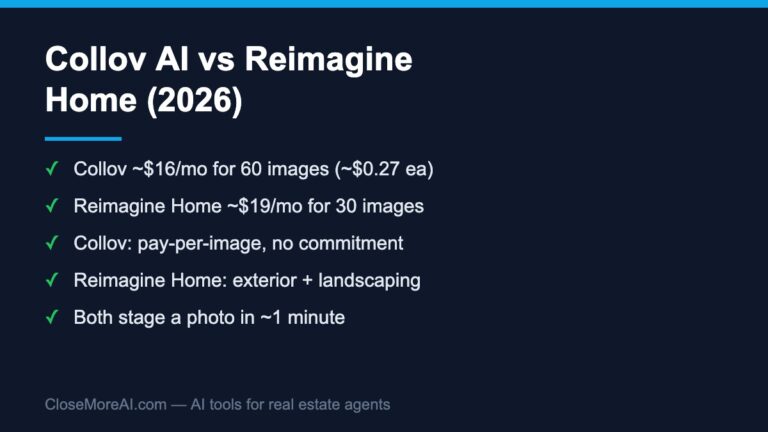
Collov AI is the one we’d hand to most agents first. It’s built specifically for real estate and design, the output is genuinely photorealistic, and the per-image cost is the lowest of the group — the $19/month entry plan includes 60 photo credits (about $0.32 an image), and the bigger tiers push Collov AI pricing per image down to roughly $0.24, so staging a full listing’s worth of photos costs less than a takeout lunch. It’s also fast and beginner-friendly: upload, pick a style, download. Beyond basic staging it can do selective furniture removal, floor and cabinet visualization, and even AI virtual tours, so it scales from a single listing photo to a whole marketing kit. Best results-per-dollar, no learning curve — this is where we’d start.
Try Collov AI on a listing photo → Read our full Collov AI review for the deep dive.
2. REimagineHome — premium look for flagship listings
REimagineHome produces beautiful, design-forward results and is popular for higher-end listings where the visuals carry the marketing. The trade-off is cost: it’s typically pricier per image than Collov, so it makes the most sense when you’re staging a flagship property rather than churning through everyday inventory.
Also worth knowing: Virtual Staging AI
Virtual Staging AI is another popular, dead-simple staging tool (upload, choose a style, download) that many US agents like for quick jobs. One caveat: at the time of writing it is only available in the US and isn’t operating in the EU, EEA, or UK — so if any of your audience is based there, point them to Collov instead.
Quick comparison
| Tool | Best for | Realism | Cost per image | Availability |
|---|---|---|---|---|
| Collov AI | Best overall value | Excellent | Lowest ($0.24–$0.32/image) | Global |
| REimagineHome | Premium listings | Excellent | Higher | Global |
| Virtual Staging AI | Fast DIY staging | Very good | Low | US only |
How to stage a listing with AI in 5 minutes
- Shoot clean photos. Wide angle, good light, room as empty as possible. AI virtual staging tools work best with a clear, uncluttered starting image.
- Pick the right style for your buyer. Modern and minimal for young professionals; warm and traditional for families. Stage to the likely buyer, not your own taste.
- Stage the rooms that sell. Living room, primary bedroom, and kitchen do the heavy lifting. You don’t need to stage every closet.
- Keep it believable. Don’t over-furnish. The goal is to help buyers picture the space, not to hide it.
- Disclose it. Always label photos as “virtually staged” per your National Association of Realtors and local MLS rules — it protects you and builds trust.
Virtual staging is one piece of the funnel
Great photos get the click, but the deal is won or lost in the follow-up. If leads go cold before you can reply, staging won’t save the sale. That’s why we pair AI staging with an AI platform that captures and follows up with every lead automatically — see our take on Homesage.ai, and the full rundown in our complete guide to the best AI tools for real estate agents.
FAQ
Are AI virtual staging tools allowed on the MLS?
Yes, as long as you clearly disclose that the photos are virtually staged. Most MLSs require a label on edited images. Never alter the actual structure of the home — only add furnishings.
How much do AI virtual staging tools cost?
Far less than physical staging. With a tool like Collov AI, plans run from $19/month for 60 photo credits (about $0.32 an image) to $127/month for 526 credits (about $0.24 an image), with extra photos at $0.24 each — cents per image rather than the $2,000–$5,000 physical staging can run per property.
Will buyers be able to tell it’s AI?
With today’s AI virtual staging tools, well-staged photos look like real photographs. Keep the furnishings realistic and proportional and the result holds up on Zillow and in person.
Bottom line
For most agents, Collov AI is the best place to start: photorealistic output, the lowest cost per image, available worldwide, and enough extra tools to cover a whole listing. Step up to REimagineHome for premium listings where the visuals are the whole pitch.
Want the rest of our tested AI stack? Grab the free 2026 AI Toolkit for Agents — 25 tools organized by your real workflow.
Related guides
- Free AI virtual staging tools — which tools are genuinely free, and when a free tier is enough for the MLS.
- Collov AI vs Virtual Staging AI — the direct comparison between our top two picks.
- Collov AI review (2026) — a full look at our top pick.
- How much AI virtual staging costs in 2026 — per-image pricing across staging types.
- Virtual staging vs traditional staging — cost, speed, and when each wins.
- Collov AI vs Pedra — staging plus broader listing-photo editing.
- Collov AI vs BoxBrownie — instant AI versus human-edited staging.