Best AI Virtual Staging Tools for Real Estate Agents (2026)
The best AI virtual staging tools turn an empty or dated room into a photorealistic, fully furnished listing photo in seconds — for the price of a coffee instead of the hundreds that physical staging costs per room. This guide compares the AI virtual staging tools real estate agents are leaning on in 2026, what each one is genuinely good at, who should use it, and who should skip it. Prices below were checked on each vendor’s official pricing page in October 2026; confirm them before you buy, because staging tools change their plans often. If you’re still deciding whether staging is worth the spend at all, start with our is virtual staging worth it? ROI breakdown.
Empty rooms photograph badly. They look smaller, colder, and harder for a buyer to picture as home — which is why staged listings tend to show better online, where almost every buyer starts. The problem with physical staging is cost and logistics: commonly $300–$800 per room and several thousand dollars for a full home, plus movers, scheduling, and rental time. AI changes the math: you upload a photo of an empty or dated room, pick a style, and a few seconds later you have a furnished version you can place in the MLS listing — as long as you disclose it, which we cover below.
What’s in this guide
- What AI virtual staging actually does
- How realistic is AI staging in 2026?
- AI staging vs human-edited vs physical
- How to judge an AI staging tool
- The AI virtual staging tools worth knowing in 2026
- Side-by-side comparison
- How to stage a listing with AI in about five minutes
- Disclosure, the MLS, and the rules
- Common mistakes to avoid
- FAQ
What AI virtual staging actually does
Modern AI virtual staging tools do three jobs. They recognize the room and its architecture, they can remove existing clutter or dated furniture, and they render new, style-appropriate furnishings that respect the room’s lighting and perspective. The best results keep the windows, floors, ceiling lines, and proportions intact so the output reads like a real photograph rather than a collage. Most tools let you restage the same room in several aesthetics — modern, farmhouse, Scandinavian, mid-century — so you can match the furnishings to the buyer you expect for that price point and neighborhood.
Where tools differ is in how much control you get and how reliably they hold the architecture. Cheaper, one-click tools are fast but occasionally warp a wall or invent a window; more capable tools give you masking, object removal, and the ability to re-roll a render until the geometry is right. For a working agent, the practical question is less “which has the prettiest demo” and more “how often will I get a usable image on the first or second try, and what does that cost per photo.”
How realistic is AI staging in 2026?
Good enough for most everyday listings, with caveats worth knowing before you rely on it. On clean, well-lit shots of empty rooms, the leading tools produce furnished images that are hard to distinguish from a real photo at listing-thumbnail size — which is where most buyers first see them. Where AI still stumbles is on harder inputs: cluttered or dimly lit rooms, unusual layouts, rooms shot at a steep angle, and reflective surfaces like mirrors and glass. In those cases you’ll see the familiar tells — furniture that doesn’t sit flat on the floor, a rug that bends with the perspective wrong, a window that duplicates or disappears, or shadows that fall in two directions at once.
The practical takeaway is that AI staging is not fully hands-off. You are the quality check, and the difference between an amateur result and a professional one is usually two or three re-rolls and a willingness to discard a render that isn’t right rather than publishing it because it’s “close enough.” Agents who treat the first output as final are the ones who end up with obviously fake photos on Zillow. Agents who shoot clean source images and review every render before it goes live get photos that genuinely compete with professionally staged listings — at a fraction of the cost. If a particular room keeps fighting the AI, that’s exactly when a human-edited service earns its higher price.
AI staging vs human-edited vs physical
It helps to see the three options as a spectrum of speed, cost, and control. Physical staging looks real because it is real, and it still wins for high-end homes where buyers walk through and expect to feel the space — but it is the slowest and most expensive by a wide margin. Human-edited digital staging (a person on a photo-editing team furnishes your image) lands in the middle: the output is consistently believable and you offload the work, but you pay per image and wait for a turnaround rather than getting an instant result. AI staging is the fastest and cheapest per image, and in 2026 the realism is good enough for most everyday listings — the trade-off is that you are the quality check, and you may need a couple of re-rolls to get a clean image. Many agents use AI for the bulk of their listings and reserve human editing or physical staging for flagship properties. Our virtual staging vs traditional staging guide works through the cost and speed math in detail.
How to judge an AI staging tool
Four things matter to a working agent, and they’re the lens to use on any tool in this category — including ones not listed here. Realism: would the image pass on Zillow without a buyer squinting at a floating sofa or a bent doorway? Control: can you remove existing furniture, mask areas, and re-render until the geometry holds, or is it one-and-done? Price per image: you stage several photos per listing and many listings per year, so the real cost is per usable image, not the headline monthly price. Ease and speed: can you go from upload to a download you’d actually publish in minutes, with no design skills? The tools below are organized by where they land on those four, not by any ranking — the right pick depends on your volume, your price point, and how much hand-holding you want.
The AI virtual staging tools worth knowing in 2026
Virtual Staging AI
Virtual Staging AI is about as simple as the category gets: upload, choose a style, download. That simplicity is the appeal for agents who want staged photos without learning anything. Pricing, verified on its site in October 2026, runs from a Basic plan at $16/month for 6 photos (about $2.67 each), to Standard at $19/month for 20 photos (about $0.95 each), Professional at $39/month for 60 photos (about $0.65 each), and Enterprise at $79/month for 150 photos (about $0.53 each). You can try it for free, but trial renders come watermarked.
Who it’s for: agents who want the shortest possible path from empty room to finished photo and stage a predictable handful of listings a month. Who should skip it: high-volume users who’ll find the per-photo cost on the smaller plans higher than credit-based competitors, and anyone who wants fine-grained control like object masking or heavy decluttering — this tool favors simplicity over control. Check regional availability on the site before committing, as coverage has varied.
Collov AI
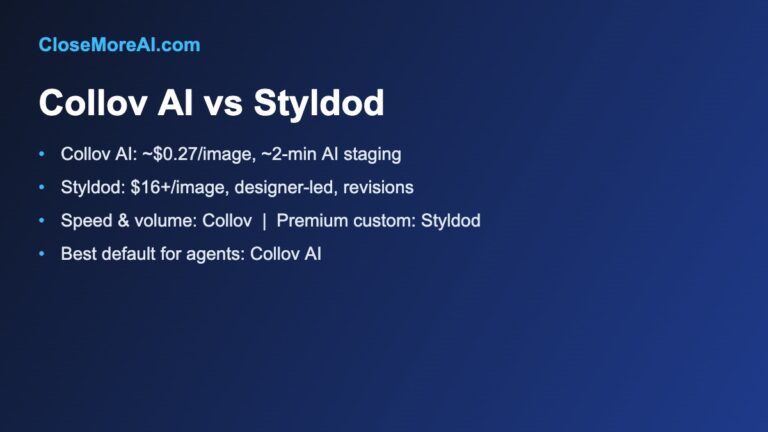
Collov AI is built for real estate and interior design and competes hard on price per image. Plans checked in October 2026: Standard at $19/month for 60 credits (about $0.32/image), Advanced at $49/month for 150 credits (about $0.33), Premium at $79/month for 263 credits (about $0.30), and Enterprise at $127/month for 526 credits, which brings additional photos down to roughly $0.24 each. There’s a free trial that produces watermarked renders. Beyond basic staging it offers furniture removal, floor and cabinet visualization, and AI virtual tours, so it can cover more of a listing’s visuals than a staging-only tool.
Who it’s for: agents who stage a lot of photos and want the lowest cost per image, plus the option to do more than furnish rooms. Who should skip it: anyone who only stages the occasional listing — a cheaper small plan elsewhere, or a free tier, will serve you better — and agents who prefer a done-for-you human edit over driving the tool themselves.
REimagineHome
REimagineHome leans toward design-forward output and a conversational, iterate-until-you-like-it workflow. A useful detail in its model, as described on its pricing page in October 2026: a credit is spent only on the final rendered image, so you can refine options without burning credits on every attempt. It offers 5 free designs at signup with no card, then Essential at $14/month for 30 credits, Pro at $49/month for 200 credits, Advanced at $74/month for 400 credits, and Agency at $99/month for 900 credits.
Who it’s for: agents staging higher-end or design-led listings who want to tune the look, and teams that need a high monthly credit ceiling. Who should skip it: agents who just want a fast one-click result and don’t care to iterate — the control is wasted on them — and very low-volume users who may not use even the Essential plan’s credits.
Pedra
Pedra is less a pure staging tool and more a listing-visuals suite: alongside virtual staging it does photo enhancement, video, virtual tours, and floor plans. Pricing checked in October 2026 is euro-denominated: a free tier with 7 image credits (no card), and a Pro plan at €29/month for 100 credits (one credit per staged image), dropping to roughly €20/month billed annually. Extra credit packs scale the per-credit cost down with volume.
Who it’s for: agents who want staging plus the rest of a listing’s media — walkthrough video, tours, floor plans — from one subscription. Who should skip it: agents who only need furnished stills; a dedicated staging tool may give more staging-specific control for the money. US agents should note pricing is in euros and will vary with the exchange rate and card fees.
BoxBrownie (the human-edited alternative)
BoxBrownie isn’t instant AI — it’s a done-for-you service where a human editor furnishes your photo, which is why it’s worth knowing as the quality-control fallback. On its pricing page in October 2026, standard residential virtual staging is US$30 per image and 360° virtual staging is US$60 per image. Because a person does the work, you wait for a turnaround rather than getting a render in seconds.
Who it’s for: agents who want a consistently believable result without touching a tool, or who need a flagship listing staged to a higher standard than a quick AI pass. Who should skip it: high-volume users on a budget — at $30 an image this is many times the per-photo cost of the AI tools above — and anyone who needs the photo back in the next few minutes.
Side-by-side comparison
Prices verified on each vendor’s official pricing page in October 2026. “Per image” figures are approximate and based on dividing a representative plan’s price by its included photos or credits.
| Tool | Type | Entry price | Approx. per image | Best for | Free option |
|---|---|---|---|---|---|
| Virtual Staging AI | One-click AI | $16/mo (6 photos) | $0.53–$2.67 | Simple, fast staging | Watermarked trial |
| Collov AI | AI, real-estate focused | $19/mo (60 credits) | $0.24–$0.33 | High volume, low cost | Watermarked trial |
| REimagineHome | AI, design-led | $14/mo (30 credits) | ~$0.11–$0.47* | Design-forward listings | 5 free designs |
| Pedra | AI listing-media suite | €29/mo (100 credits) | ~€0.14–€0.29 | Staging + video/tours | 7 free credits |
| BoxBrownie | Human-edited | $30/image | $30 (360°: $60) | Flagship / hands-off | No |
*REimagineHome spends a credit only on the final render, so the effective per-image cost depends on how many finals you produce from your monthly credits. For a deeper per-image breakdown across staging types, see how much AI virtual staging costs in 2026.
How to stage a listing with AI in about five minutes
- Shoot clean photos. Wide angle, good natural light, room as empty as possible. AI staging works best from a clear, uncluttered starting image — shadows and clutter are what trip up the render.
- Pick the right style for your buyer. Modern and minimal for young professionals; warm and traditional for families; something elevated for a luxury price point. Stage to the likely buyer, not your own taste.
- Stage the rooms that sell. The living room, primary bedroom, and kitchen do the heavy lifting. You don’t need to furnish every closet — a handful of strong rooms beats a dozen mediocre renders.
- Check the geometry, then re-roll if needed. Look for bent walls, floating furniture, doubled windows, or furniture that blocks a doorway. If something’s off, re-render or switch tools — a believable image is the whole point.
- Keep it believable. Don’t over-furnish or hide a room’s flaws. The goal is to help a buyer picture living there, not to stage a surprise at the showing.
- Disclose it. Label every edited photo as virtually staged, per the rules below.
Disclosure, the MLS, and the rules
Virtual staging is allowed and widely used, but disclosure is not optional. The National Association of Realtors Code of Ethics (Article 12) requires a true picture in advertising, and most MLSs have their own rule requiring that materially altered photos be labeled — commonly with a caption such as “virtually staged” on the image itself. The safe practice is to label every staged photo clearly, keep at least one unedited photo of each staged room in the listing so buyers can see the real space, and never alter the structure of the home. Add or remove furniture and decor; do not paint over a crack, erase a power line, hide a neighboring building, or change what the room physically is. Rules vary by MLS and by state advertising law, so confirm the exact wording your MLS expects. Done right, disclosure protects you from a misrepresentation complaint and actually builds trust — buyers understand staging; they don’t forgive feeling misled.
Common mistakes to avoid
A few errors show up again and again. Over-furnishing to make a room look bigger usually does the opposite and reads as fake. Staging to your own taste instead of the target buyer’s wastes the advantage of being able to restyle in seconds. Skipping the unedited photo leaves buyers unable to see the real room and invites complaints. Publishing the first render without checking geometry is how floating lamps and bent walls end up on Zillow. And forgetting the disclosure label turns a legitimate marketing tool into an ethics and MLS problem. None of these is about the tool — they’re about how you use it.
Virtual staging is one piece of the funnel
Great photos earn the click, but the deal is won or lost in the follow-up. If leads go cold before you reply, staging won’t save the sale. Pair your staging workflow with a system that captures and follows up with every lead promptly — our complete guide to the best AI tools for real estate agents covers the rest of the stack, from lead response to CRM.
FAQ
Are AI virtual staging tools allowed on the MLS?
Yes, as long as you clearly disclose that the photos are virtually staged. Most MLSs require a label on materially edited images, and NAR’s Code of Ethics requires a true picture in advertising. Add or remove furnishings only — never alter the actual structure of the home — and confirm your MLS’s exact disclosure wording.
How much do AI virtual staging tools cost?
Far less than physical staging. AI tools generally run from around $14–$79 a month, which works out to roughly $0.25–$1 per image on the higher-volume plans — cents per photo rather than the hundreds per room physical staging can cost. Human-edited services like BoxBrownie charge about $30 per image. All prices here were verified on the vendors’ official pages in October 2026.
Will buyers be able to tell it’s AI?
With today’s tools, a well-made staged photo usually looks like a real photograph. The giveaways are over-furnishing, warped geometry, and lighting that doesn’t match the room — all of which you can avoid by keeping furnishings realistic and proportional and by re-rolling any render with obvious errors. Regardless, you must disclose that the photo is staged, so passing as real is never the goal.
Which AI virtual staging tool is best?
There’s no single best — it depends on your volume and needs. For the lowest cost per image at high volume, a credit-based tool like Collov AI is strong; for the simplest one-click workflow, Virtual Staging AI; for design-led or higher-end listings, REimagineHome; for staging plus video and tours in one place, Pedra; and for a hands-off, human-edited result on a flagship listing, BoxBrownie. Match the tool to how many listings you stage and how much control you want.
Can I remove existing furniture, not just add it?
Many AI staging tools now include furniture or object removal, so you can clear a cluttered or dated room before restaging it. Collov and Pedra, for example, offer removal features; simpler one-click tools may only add furnishings to an already-empty room. If decluttering matters to your listings, check for that specific feature before subscribing.
Is a free virtual staging tool good enough for the MLS?
Sometimes. Free tiers usually watermark the output or limit resolution, which isn’t MLS-ready, but a few genuinely free options can produce a usable image for low-stakes listings. We break down which ones are actually free and when a free tier is enough in our free AI virtual staging tools guide.
Bottom line
AI virtual staging has made good-looking listing photos cheap and fast enough that there’s little reason to publish empty rooms. Pick by how you work: Collov AI for the lowest cost per image at volume, Virtual Staging AI for the simplest workflow, REimagineHome for design-led listings, Pedra for staging plus the rest of your listing media, and BoxBrownie when you’d rather hand a flagship listing to a human editor. Whatever you choose, disclose the staging and keep it believable — that’s what protects the sale.
Want the rest of the stack? Grab the free 2026 AI Toolkit for Agents — the tools organized by your real workflow.
Related guides
- Free AI virtual staging tools — which tools are genuinely free, and when a free tier is enough for the MLS.
- How much AI virtual staging costs in 2026 — per-image pricing across staging types.
- Virtual staging vs traditional staging — cost, speed, and when each wins.
- Is virtual staging worth it? — the ROI data behind the spend.
- The complete guide to AI tools for agents — the full stack, from lead response to CRM.
Updated October 2026. Pricing verified on each vendor’s official pricing page in October 2026; plans and prices change often, so confirm current terms on the vendor’s site before subscribing.