Free AI Virtual Staging Tools for Real Estate Agents (2026)
Affiliate disclosure: CloseMoreAI is reader-supported. Some links below are affiliate links, and we may earn a commission (at no extra cost to you) if you sign up. We only recommend tools we believe help agents close more deals.
Search “free AI virtual staging” and you get a wall of tools all promising photorealistic, furnished rooms for nothing. Some of that is real — and some of it is a free trial dressed up as a free tool. This guide sorts the two out. It covers what “free” actually gets you in 2026, the tools genuinely worth testing at zero cost, when a free tier is enough for a listing and when it quietly costs you a sale, and the fastest way to stage your first photo today without spending a cent.
The short version: free AI virtual staging is a fantastic way to test whether the quality is good enough for your market before you pay anything. It is a weaker choice as a permanent workflow, because the free layer of almost every tool comes with watermarks, low resolution, or commercial-use limits that are a problem the moment a photo hits the MLS. Use free to prove the tool; move to a cheap paid plan to actually list.
What’s in this guide
- What “free” really means in AI virtual staging
- The best free AI virtual staging tools to try in 2026
- When free is enough — and when it costs you the sale
- How to stage your first listing photo free, step by step
- 4 mistakes agents make with free staging tools
- FAQ
What “free” really means in AI virtual staging
Almost no AI virtual staging tool is free forever with no strings. In practice, “free” comes in three flavors, and knowing which one you’re looking at saves a lot of wasted uploads:
- Free trial: full-quality output, but capped — a handful of images or a few days, after which you pay. This is the most useful kind, because what you produce is genuinely MLS-ready.
- Free tier with limits: ongoing free use, but the output is watermarked, lower-resolution, slower, or restricted to non-commercial use. Great for testing realism, risky to put on a live listing.
- “Free” that isn’t: a preview you can generate but not download without paying, or a demo that stages a sample photo, not yours. Fine for a look; useless for a real listing.
The practical takeaway for a working agent: treat free as a quality test, not a staging pipeline. The goal of your free session is to answer one question — “does this tool make a room that would pass on Zillow without looking fake?” — before any money changes hands.
The best free AI virtual staging tools to try in 2026
Here are the tools worth spending your free credits on, starting with the one we’d hand most agents first.
1. Collov AI — best free trial to test real quality (our top pick)
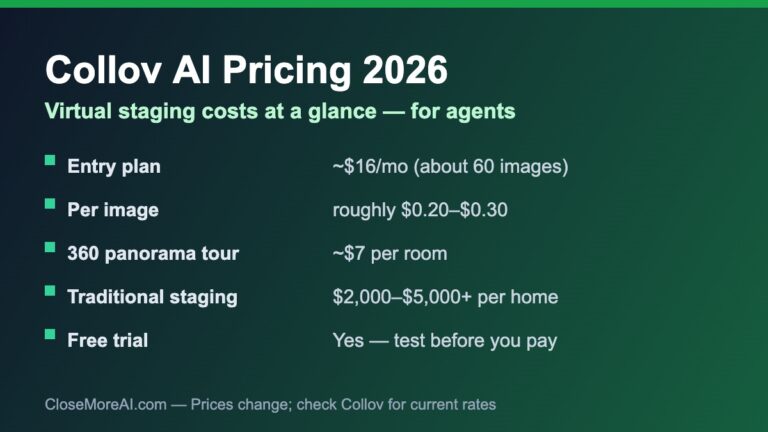
Collov AI is where we’d start, because it lets you stage a photo on a free trial before you commit — and the output is genuinely photorealistic rather than the cartoonish furniture some free tools drop into a room. It’s built for real estate specifically, it’s available worldwide (not US-only, which matters if any of your listings or audience are abroad), and if the quality wins you over, the entry plan is only $19/month for 60 photo credits — about $0.32 an image, or less than a takeout lunch for a whole listing’s worth of photos. So the free trial isn’t a dead end: it flows straight into the cheapest credible paid option in the category. See our full Collov AI review and the Collov pricing breakdown for the deep dive.
👉 Stage a listing photo free with Collov AI →
2. REimagineHome — free credits for design-forward looks
REimagineHome offers a limited free tier to test its staging, and the results skew stylish — a good fit for higher-end listings where the visuals carry the marketing. The free layer is enough to judge quality; you’ll want a paid plan once you’re staging real inventory, and its per-image cost tends to run higher than Collov, so reserve it for flagship properties rather than everyday churn. If you are weighing these two specifically, our Collov AI vs Reimagine Home comparison breaks down the head-to-head.
3. Spacely AI — free renders for quick concepts
Spacely AI gives you a small number of free renders to start and is fast for testing different styles on the same room. As with the others, the free output is best treated as a proof of concept — check the resolution and any watermark before you assume a free image is listing-ready.
4. Virtual Staging AI — simple, but US-only
Virtual Staging AI is a dead-simple upload-pick-download tool with a free trial that many US agents like for fast jobs. The one caveat worth knowing: at the time of writing it is only available in the US and isn’t operating in the EU, EEA, or UK — so if you or your audience are based there, use Collov instead.
Also worth a free look
A handful of other tools — ApplyDesign, AI HomeDesign, and Pedra among them — offer free trials or free-to-try modes. They’re fine for a second opinion on quality, but none changes the core advice: use the free session to test, then move to a paid plan (Collov is the cheapest credible one) for watermark-free, full-resolution, MLS-ready images.
When free is enough — and when it costs you the sale
Free is genuinely enough when you’re testing a tool’s realism, staging a photo for a private client preview, mocking up a style for a listing consultation, or deciding which paid plan to buy. In all of these, a watermarked or lower-res image does the job.
Free quietly costs you when the image goes public. A watermark on a Zillow photo reads as amateur; a low-resolution render looks soft next to your other listing photos; and some free tiers prohibit commercial use outright, which putting a staged photo on the MLS violates. The math is not close: paid staging with a tool like Collov AI runs cents per image, while physical staging runs $300–$800 per room and roughly $3,000 for a full home. If a clean staged photo helps a listing sell faster or for more — and staged listings consistently do — a few dollars of paid credits is the easiest ROI in your marketing budget. For the full cost picture across staging types, see our AI virtual staging cost breakdown.
How to stage your first listing photo free, step by step
- Shoot a clean photo. Wide angle, good natural light, the room as empty and uncluttered as possible. AI staging works best from a clear starting image.
- Start a free trial on one tool. Begin with Collov AI so your test output is high quality and the upgrade path is cheap if it wins.
- Pick the style for your buyer, not your taste. Modern and minimal for young professionals; warm and traditional for families. Stage to the likely buyer.
- Judge it honestly. Zoom in. Do the windows, floors, and proportions look real? Is there a watermark? Is the resolution high enough to sit next to your other listing photos? That answer tells you whether free is enough or you should upgrade.
- Disclose it. Always label the image as “virtually staged” per your National Association of Realtors and local MLS rules — it protects you and builds trust.
4 mistakes agents make with free staging tools
- Putting a watermarked photo on the MLS. It reads as amateur and can breach MLS image rules. If it’s going public, remove the watermark — which almost always means a paid plan.
- Ignoring commercial-use limits. Some free tiers are for personal use only. Staging a listing you’re paid to sell is commercial use. Read the free tier’s terms before you publish.
- Over-furnishing to show off the AI. The goal is to help a buyer picture the space, not to cram it. Keep furnishings realistic and proportional.
- Judging a tool by one bad render. Free trials are for testing — try two or three styles and a couple of rooms before you write a tool off or commit to it.
Get the free toolkit
Want our hand-picked stack of AI tools for agents? The 2026 AI Toolkit for Real Estate Agents is a free PDF with 25 tested tools organized by workflow — lead gen, listings, follow-up and closing — plus the prompts and the per-lead cost math we use to judge them. Enter your email and we’ll send it straight over:
No spam, ever. Unsubscribe anytime.
Free AI virtual staging: FAQ
Is AI virtual staging really free? Usually it’s a free trial or a limited free tier rather than unlimited free use. Free trials give full-quality images but cap how many you can make; free tiers let you keep going but often add a watermark, lower the resolution, or restrict commercial use. The most reliable approach is to test quality on a free trial and then move to a low-cost paid plan for MLS-ready photos.
Can I use a free staged photo on the MLS? Only if it’s watermark-free, high enough resolution, and the tool’s free tier permits commercial use — and always with a “virtually staged” disclosure. Many free tiers fail one of those tests, which is why agents usually upgrade to a cheap paid plan before publishing.
What’s the best free AI virtual staging tool to start with? We start agents on Collov AI’s free trial: the output is photorealistic, it’s available worldwide, and if it wins you over the entry plan is only $19/month — the cheapest credible paid option in the category, so the free test flows straight into an affordable workflow.
Do buyers notice AI-staged photos? With today’s tools, well-staged photos look like real photographs. Keep furnishings realistic and proportional, use full-resolution output, and the result holds up on Zillow and in person.
How much does paid AI staging cost if I upgrade? With a tool like Collov, plans start around $19/month for 60 photo credits (about $0.32 an image), which is cents per photo versus the $300–$800 per room physical staging costs. See our cost breakdown for the full picture.
Related guides
- Best AI virtual staging tools for real estate agents — the full paid comparison once you’re ready to buy.
- How much AI virtual staging costs in 2026 — per-image pricing across staging types.
- Collov AI review (2026) — a full look at our top pick.
- Virtual staging vs traditional staging — cost, speed, and when each wins.
- The complete tested guide to AI tools for agents — the whole stack, by workflow.