Best AI Headshot Generators for Real Estate Agents (2026)
Your headshot is doing more work than you think. It’s on your business cards, your yard signs, your email signature, Zillow, Realtor.com, and every social post — and it’s usually the first thing a potential client judges you on. A dated, blurry, or obviously-cropped-from-a-wedding photo quietly costs you credibility before you ever say a word.
The old fix was a $300–$500 studio session you scheduled weeks out and redid every couple of years. The new fix: AI headshot generators that turn a few selfies into dozens of professional, on-brand portraits in minutes, for a fraction of the price. This guide explains how they work, how to judge one, and how the main tools compare on price and quality in 2026 — so you can pick the one that fits your budget and your market, not the one with the biggest ad budget.
Updated September 2026. Prices below are taken from each vendor’s official pricing page on the date of writing; AI-headshot pricing changes often, so confirm the current number on the vendor’s site before you buy.
What an AI headshot generator actually does
You upload a handful of regular photos of yourself — different angles, decent light, a few expressions. The tool trains a short-lived model on your face, then generates brand-new images of you in professional settings: business attire, clean or editorial backgrounds, flattering studio lighting, in a range of styles and outfits. You review the batch, pick the ones you like, and download high-resolution files ready for your website, MLS profile, and socials. No studio, no photographer, no scheduling, and no half-day off the calendar.
The quality jump over the last two years is the reason this is worth revisiting even if you tried it in 2024. The better tools now render skin texture, hair, and eyes closely enough that a well-chosen result is hard to distinguish from a studio shot — provided you feed it good source photos and you don’t over-stylize the output. The failure cases are still real (waxy skin, mangled hands, teeth that aren’t yours, a jaw that isn’t quite right), which is exactly why choosing the right tool and the right settings matters.
Why agents specifically benefit
Real estate is a face-to-face, trust-driven business, and your photo is on more surfaces than almost any other profession’s: the sign in the yard, the portal profile, the mailer, the email footer, the open-house flyer, the reel. That creates three advantages that matter more for agents than for the average LinkedIn user.
First, consistency across every surface. When the same current, professional portrait appears on Zillow, your website, your business card, and your Instagram, you look established. Mismatched or dated photos do the opposite. Second, speed of refresh. Changed brokerages, updated your branding colors, got a new haircut, or finally ditched the photo from five years and one style era ago? You can regenerate a matched set in an afternoon instead of rebooking a shoot. Third, team consistency. A brokerage or a team can put everyone through the same tool and the same background/attire choices and end up with a roster of portraits that actually looks like one brand — something that’s expensive and logistically painful to arrange with a photographer.
How to choose an AI headshot tool (what actually matters for agents)
Most “best of” lists rank these tools as if realism were the only variable. For a working agent, a few practical criteria matter just as much:
- Realism first. This is non-negotiable, because a headshot that reads as obviously AI does more damage than an average phone photo. Look at a tool’s real customer examples (not just its hero images) before you pay.
- Resolution — and whether you need print. Web profiles are forgiving, but yard signs, mailers, and printed flyers are not. If your photo goes on anything physical, prioritize a tool that delivers high-resolution or 4K downloads. If you only need web and social, standard resolution is fine and cheaper.
- Outfit and background variety. More attire and backdrop options let you match the look to the market — editorial and dark for luxury, warm and approachable for first-time buyers. Cheaper tiers usually restrict you to one outfit and one background.
- Turnaround. Most tools deliver in 15 minutes to two hours. Rarely a deciding factor, but worth knowing if you need something today.
- Team or per-person pricing. If you’re outfitting a team or brokerage, a per-person/credit model with volume discounts will beat buying individual plans one at a time.
- Data and privacy. You’re uploading your face. Check how long the tool keeps your photos and the trained model, whether it deletes them on request, and what its terms say about reuse. This matters more than the price difference between tiers.
- Commercial usage and ownership. Confirm you get full rights to use the images commercially (you will — your face is on marketing), and that downloads are unwatermarked.
- Money-back guarantee. Because results vary with your source photos, a refund policy is a genuine safety net. Several tools offer 14- to 30-day guarantees.
The best AI headshot generators for real estate agents in 2026
There’s no single “best” tool for every agent — the right pick depends on whether you need print-grade resolution, how many looks you want, and whether you’re buying for one person or a team. Below are four established, agent-appropriate options with pricing verified on each vendor’s official page in September 2026, followed by an honest note on the free route. Prices are one-time per person unless noted.
| Tool | Starting price (one-time) | Headshots | Resolution | Turnaround | Best for |
|---|---|---|---|---|---|
| Aragon AI | $35 – $75 | 40–100 | Standard; enhanced (1792×2176) on top tier | 15–45 min | Lots of usable looks, realism, a dedicated real-estate flow |
| HeadshotPro | $29 – $59 | 30–70 | 4K on top tier | 15 min – 2 hr | Teams and brokerages (per-person credits, volume discounts) |
| BetterPic | from $35 | 20–120 | 4K on all tiers | 1–2 hr | Print-grade 4K on every plan; money-back guarantee |
| Secta AI | $49 | 200+ | HD | under 2 hr | The largest batch and most styles in one purchase |
Aragon AI
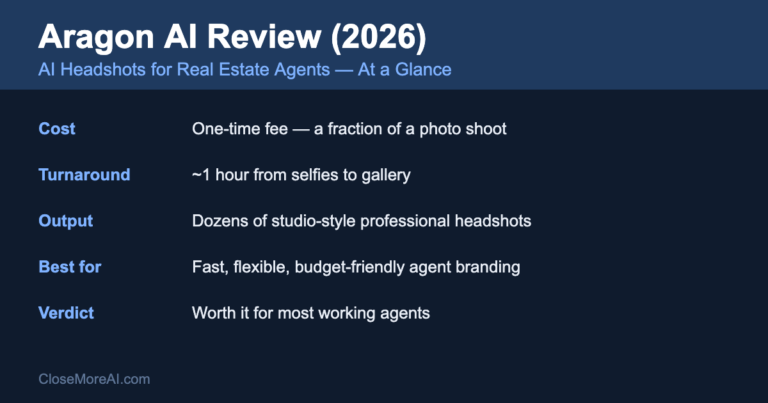
Aragon AI is one of the most widely used consumer headshot tools, and it’s a reasonable default for agents because it pairs strong realism with a dedicated real-estate headshot flow tuned for this exact use case. You upload selfies, wait a short while, and get a large batch of portraits across different outfits and backgrounds. On its official pricing page (September 2026), plans are one-time: Basic at $35 (40 headshots, 1 outfit, 1 background), Standard at $45 (60 headshots, 2 outfits, 2 backgrounds), and Executive at $75 (100 headshots, all outfits and backgrounds, enhanced resolution). We break down which tier agents actually need in the Aragon AI pricing guide.
Who it’s for: agents who want the most usable images per dollar and value the variety of outfits/backgrounds to match different markets. The Executive tier’s higher resolution is the one to choose if any of the photos will be printed.
Who should skip it: agents who need guaranteed 4K on the entry plan (Aragon’s standard tiers aren’t 4K), or a brokerage buying for a whole team — a per-person team tool will be cheaper at volume.
HeadshotPro
HeadshotPro is built with teams in mind, which makes it the natural pick for a brokerage or a group that wants a consistent look across everyone. Its official pricing page (September 2026) lists one-time individual plans at $29 (30 headshots, ~2-hour turnaround), $39 (50 headshots, ~30 minutes), and $59 (70 headshots, 4K downloads, portrait and landscape, ~15 minutes). For groups it sells per-person credits — roughly in the $25–$39-per-shoot range depending on volume, with escalating discounts as the credit count rises and an enterprise tier (SSO, provisioning) for larger organizations.
Who it’s for: teams and brokerages outfitting multiple people who want one consistent style, and individuals who want 4K plus portrait-and-landscape formats on the top plan.
Who should skip it: a solo agent who just wants the biggest batch of images for the lowest one-time price — a single-person tool may deliver more photos per dollar.
BetterPic
BetterPic leads with 4K quality on every tier, which is its main differentiator for anyone whose photo lands on print. Its site (September 2026) advertises 4K headshots starting at $35 as a one-time, single-person purchase, with tiers that deliver 20, 60, and 120 headshots (more outfits/styles and faster turnaround on the higher tiers) and a 100% money-back guarantee. It also offers human-retouch options on the top tier.
Who it’s for: agents who want print-grade 4K without paying for a premium tier to get it, and anyone reassured by a money-back guarantee.
Who should skip it: budget-focused agents who only need web/social images and don’t want to pay for 4K they won’t use, or teams — BetterPic’s individual plans are per person.
Secta AI
Secta AI stands out for sheer volume: its headshots page (September 2026) lists a one-time professional plan at $49 that delivers 200+ HD photos across 90+ styles in under two hours, with a 30-day money-back guarantee. If your bottleneck is having enough good options to choose from, Secta gives you the widest pool in a single purchase.
Who it’s for: agents who want the largest possible batch and the most style variety in one buy, and who are comfortable sifting a big set to find the keepers.
Who should skip it: agents who specifically need 4K for large-format print (Secta advertises HD, not 4K), or who’d rather have a smaller, more curated set than sort through 200 images.
The free / DIY route (and its limits)
You can get a passable headshot from a general image tool — the image features in ChatGPT, Google’s Gemini, or a phone editing app — often for free or for the cost of a subscription you already pay for. For a quick social avatar, that can be enough. For a client-facing headshot on Zillow and your yard sign, the dedicated tools still win: they’re tuned specifically for realistic professional portraits, they give you high-resolution downloads and clear commercial-use terms, and they produce a large batch to choose from rather than one image at a time. If the photo represents your business, the $30–$50 for a specialist tool is usually worth it. Whichever route you take, the same rule applies: the result has to look unmistakably like you.
How to get a great AI headshot (so it doesn’t look fake)
- Feed it good source photos. Use 6–15 clear, recent selfies with varied angles and expressions, good natural light, and no sunglasses or heavy filters. Garbage in, garbage out — this single factor drives most of the quality difference between a great result and an uncanny one.
- Match the look to your market. Going after luxury sellers? Choose darker, editorial backgrounds and sharp attire. First-time buyers? A warmer, approachable look tends to convert better. Generate a couple of variations if you serve both.
- Stay recognizable. Pick the results that genuinely look like you. Clients will meet you in person, and a photo that oversells creates a small credibility gap the moment you shake hands. If a result smooths your face into someone else, discard it.
- Get a set, not one image. Grab a vertical for socials, a horizontal for your website banner, and a clean neutral one for the MLS. Consistency across platforms reads as professional.
- Inspect the details. Zoom in on eyes, teeth, ears, glasses, and the collar/lapel before you commit. These are where AI artifacts hide. A single warped earring or an extra shirt button is enough to make a photo read as fake.
MLS, portal, and honesty considerations for agents
A few real-estate-specific points that don’t come up in generic headshot guides:
Keep it clearly you. The National Association of REALTORS® and most brokerages expect an agent’s photo to be a current, accurate likeness. An AI headshot is fine — it’s still a photo of you — but a heavily idealized version that no longer resembles you at the door works against the trust your headshot is supposed to build. Recognizability isn’t just aesthetic advice; it’s the professional standard.
Check your MLS and portal photo specs. Some MLSs and profile pages have minimum resolution or aspect-ratio requirements and rules against logos or text on the headshot itself. Download a clean, high-resolution, text-free version for those, and save the stylized ones for social.
Don’t confuse this with listing photos. AI-generated or AI-altered property photos are a different matter entirely and can run into MLS rules and disclosure obligations — virtual staging usually has to be labeled, and misrepresenting a property’s condition is a real problem. This guide is about your personal headshot, where generating a portrait of yourself raises none of those issues. Keep the two use cases separate.
Common mistakes to avoid
- Uploading low-quality or old selfies. The model can only work with what you give it. Recent, well-lit, varied photos are worth more than any tier upgrade.
- Over-glamorizing. The goal is your best professional self, not a stranger. Restraint reads as confidence.
- Buying the cheapest tier and getting one outfit. If you want options for different markets, the mid tier’s extra outfits and backgrounds usually pay for themselves.
- Using a web-resolution image on a printed sign. Match the resolution to where the photo will live. Print needs the high-res or 4K download.
- Never updating it. The whole advantage of AI headshots is how cheap refreshing is. Redo it when your look changes rather than living with a stale photo for years.
FAQ
Do AI headshots look real?
The best ones do. With good source selfies, the leading tools produce portraits most people can’t distinguish from a studio shot. The key is recognizability — choose images that clearly look like you, and inspect the details (eyes, teeth, ears, collar) before committing. For the full rundown of the giveaways and how to avoid them, see do AI headshots look fake?
How much do AI headshots cost?
Typically $29–$75 as a one-time purchase for a single person, and you usually get dozens (sometimes 200+) of images instead of a handful. That’s a fraction of a $300–$500 studio session, and it makes refreshing your look whenever your brand changes affordable. For a tier-by-tier breakdown, see our 2026 AI headshot cost guide.
Which AI headshot tool is best for real estate agents?
It depends on your need. For the most usable looks and a real-estate-specific flow, Aragon is a strong default. For a team or brokerage, HeadshotPro’s per-person credits scale best. For guaranteed 4K on every tier, BetterPic. For the biggest batch and most styles in one purchase, Secta. Match the tool to whether you need print-grade resolution and whether you’re buying for one person or many.
Do I need 4K resolution?
Only if your photo will be printed — yard signs, mailers, flyers, or large-format anything. For web and social profiles (Zillow, your site, Instagram), standard or HD resolution is fine, and you can save money by not paying for 4K you won’t use.
Can I use AI headshots on the MLS and Zillow?
Yes — they’re professional photos of you. Use a clean, neutral, high-resolution version for your MLS and portal profiles (check each one’s size and no-text rules), and save the more stylized shots for social media.
Is it safe to upload my photos to these tools?
Reputable tools let you delete your source photos and trained model, and spell out data handling in their terms. Before uploading, check the tool’s retention and deletion policy and confirm you keep full commercial rights to the images. Treat data practices as a real selection criterion, not an afterthought.
Bottom line
A sharp, current headshot is the cheapest credibility upgrade in your business, and AI has turned it into a same-day job for the price of lunch. There’s no universal best tool: pick Aragon for variety and a real-estate flow, HeadshotPro for teams, BetterPic for 4K on every tier, or Secta for the largest batch — then feed it good selfies, choose results that unmistakably look like you, and use a consistent set across your website, MLS, and socials.
Want the rest of the stack? See the guide to the best AI tools for real estate agents, or grab the free 2026 AI Toolkit — 25 tools organized by your real workflow.